
 by Nana Oware
Minimalist Homepage Dashboard for MicroServices
Finding the perfect free, open-source, self-hosted dashboard designed to organize all your home lab services, self-hosted apps, bookmarks, and system stats in one centralized location , can be a real pain. Over the years of selfhosting, I have tried homer, dashy, homarr and flame among others. All these services are really great but I really wanted a simple dashboard with less resources for my microservices.
Flare is almost identical to flame but a trimmed version with low resource, and can be set with an authentication for access. Simply create the configuration folder as:
mkdir app
Now copy this code snippet into the docker-compose.yaml file as:
name: flare
services:
  flare:
    image: soulteary/flare:0.5.1
    networks:
      - traefik
    volumes:
      - ./app:/app
    command: flare
    environment:
      # 开启登陆
      - FLARE_DISABLE_LOGIN=0
      # 设置登陆账号
      - FLARE_USER=flare
      # 指定你自己的账号密码,如未设置 `FLARE_USER`,则会默认生成密码并展示在应用启动日志中
      - FLARE_PASS=change_me
    labels:
      - "wud.watch=false"
      - "traefik.enable=true"
      - "traefik.docker.network=traefik"
      - "traefik.http.routers.flare-http.entrypoints=http"
      - "traefik.http.routers.flare-http.middlewares=redir-https"
      - "traefik.http.routers.flare-http.rule=Host(`flare.linuxpad.blog`)"
      - "traefik.http.routers.flare-http.service=noop@internal"
      - "traefik.http.routers.flare-https.entrypoints=https"
      - "traefik.http.routers.flare-https.tls=true"
      - "traefik.http.routers.flare-https.middlewares=gzip"
      - "traefik.http.routers.flare-https.rule=Host(`flare.linuxpad.blog`)"
      - "traefik.http.services.flare-backend.loadbalancer.server.scheme=http"
      - "traefik.http.services.flare-backend.loadbalancer.server.port=5005"
      - "traefik.http.routers.flare-https.middlewares=authelia@docker"


networks:
  traefik:
    external: true
Finally, move to the app folder and create these two files as apps.yml & bookmarks.yml. Copy this code snippet into the apps.yml as:
links:
  - name: "Regexp 101"
    link: "https://regex101.com/"
    icon: "ladybug"
    desc: "Nana-Lab"
  - name: "Little-Link"
    link: "https://link.nanaoware.online"
    icon: "cardAccountDetailsStar"
    desc: "Professional Page"
  - name: "Outline"
    link: "https://outline.lab.com"
    icon: "evernote"
    desc: "Notebook"
  - name: "Blog"
    icon: "ghost"
    link: "https://linuxpad.blog"
  - name: "wikipedia"
    link: "https://www.wikipedia.org/"
    icon: "wikipedia"
    desc: "wiki-page"
  - name: "PVE"
    link: "https://192.168.1.177:8006"
    icon: "gentoo"
    desc: "PVE Cluster"
  - name: "Gitea"
    link: "https://git.nanaoware.online"
    icon: "git"
  - name: "Private Bin"
    link: "https://archive.lab.com"
    icon: "archive"
  - name: "Carbon"
    link: "https://carbon.lab.com"
    icon: "GamepadVariant"
  - name: "Owncloud"
    link: "https://owncloud.nanaoware.online"
    icon: "cloudLock"
  - name: "Switch"
    link: "http://192.168.8.1"
    icon: "RouterNetwork"
  - name: "File-Server"
    link: "https://192.168.1.150:9090"
    icon: "nas"
  - name: "Nextcloud"
    link: "https://nextcloud.nanaoware.online"
    icon: "folderCheck"
  - name: "Deeper-Connect"
    link: "https://switch.lab.com"
    icon: "switch"
  - name: "Vault"
    link: "https://vaultwarden.nanaoware.online"
    icon: "shieldLockOpen"
  - name: "Home-Lab"
    link: "https://github.com/dagyepong/Home-Lab"
    icon: "github"
  - name: "Gitlab"
    link: "https://gitlab.com/dagyepong"
    icon: "gitlab"
  - name: "设备: Wi-Fi6 AP"
    link: "http://local.deeper.network"
    icon: "routerWireless"
  - name: "设备: Torrent"
    link: "http://192.168.1.152:9091"
    icon: "oneUp"
Next is to copy this code into the bookmarks.yml file as:
categories:
  - id: 1
    title: Stuff
  - id: 2
    title: Media
  - id: 3
    title: Social
  - id: "string-name"
    title: 新分类
  - id: "category-name"
    title: 新分类

links:
  - name: "Gotify"
    link: "https://gotify.linuxpad.blog"
    icon: "nuke"
    category: 1

  - name: "Forgejo"
    link: "https://forgejo.linuxpad.blog"
    icon: "owl"
    category: 1

  - name: "Uptime-Kuma"
    link: "https://uptime-kuma.linuxpad.blog"
    icon: "uptime-kuma"
    category: 1

  - name: "Linuxpad IT Tools"
    link: "https://it-tools.linuxpad.blog"
    icon: "owl"
    category: 1

  - name: "Cronicle"
    link: "https://cronicle.linuxpad.blog"
    icon: "jira"
    category: 1

  - name: "Pico-share"
    link: "https://pico.linuxpad.blog"
    icon: "jira"
    category: 3

  - name: "Pwgen"
    link: "https://pwgen.linuxpad.blog"
    icon: "salesforce"
    category: 2

  - name: "Zitadel"
    link: "https://zitadel.linuxpad.blog"
    icon: "jira"
    category: 1


  - name: "Adguard"
    link: "http://192.168.8.195"
    icon: "salesforce"
    category: 1


  - name: "Paperless"
    link: "https://paperless.linuxpad.blog"
    icon: "jira"
    category: 2


  - name: "Portainer"
    link: "https://portainer.linuxpad.blog"
    icon: "docker"
    category: 2

  - name: "Beszel"
    link: "https://beszel.linuxpad.blog"
    icon: "pacman"
    category: 2

  - name: "Dozzle"
    link: "https://dozzle.linuxpad.blog"
    icon: "pacman"
    category: 2

  - name: "Lunarlytics"
    link: "https://luna.linuxpad.blog"
    icon: "pacman"
    category: 2

  - name: "Pibox"
    link: "http://kubesail.com"
    icon: "kubernetes"
    category: 3


  - name: "Homepage"
    link: "http://192.168.8.187:3030"
    icon: "drupal"
    category: 2

  - name: "Kickstarter"
    link: "https://kickstarter.com"
    category: 3
    icon: "kickstarter"

  - name: "Linuxpad"
    link: "https://tech.nanaoware.online"
    icon: "wordpress"
    category: 3

  - name: "Traefik"
    link: "https://traefik.linuxpad.blog"
    icon: "bugCheck"
    category: 3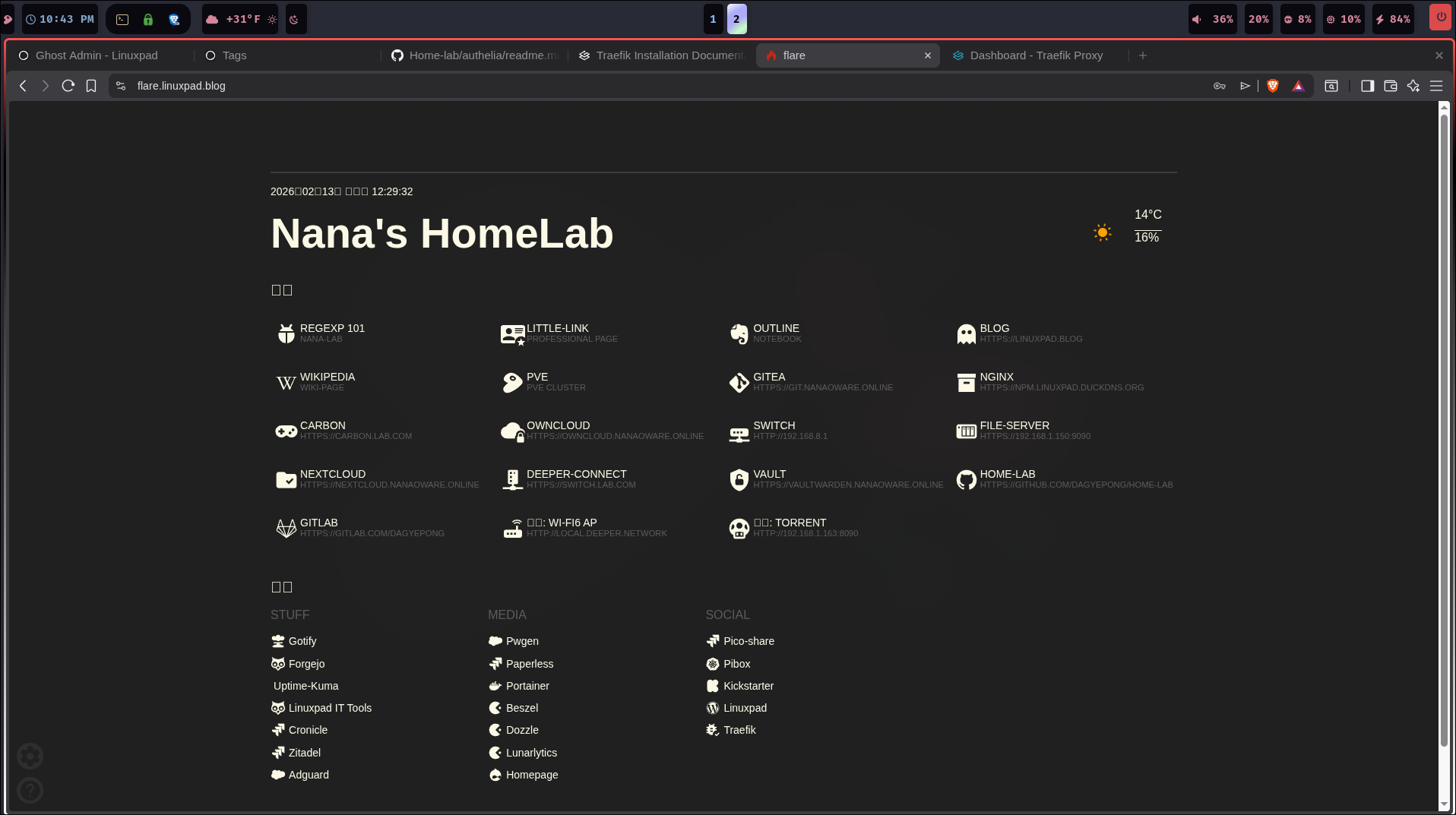
That's it!