Vaultwarden Docker Install

Vaultwarden is the unofficial open-source server implementation of the Bitwarden API written in Rust. It is compatible with Bitwarden clients and can be used as a replacement for the official Bitwarden server.
This guide presumes that you have a server running , and that you have docker and traefik setup. You can check these links to get them setup if you need help.
How to Install Docker on Arch Linux: A Step-by-Step Guide
If you’re venturing into the world of containerization and looking for an efficient way to deploy applications, Docker is the tool you need. But what’s better than harnessing the power of containerization on a linux distribution that keeps you on the cutting edge? In this guide, we’ll
 Nana Oware
Setting up a Reverse Proxy with Docker and Let’s Encrypt
These days, many applications are installed via containers. Traefik is a modern open-source reverse proxy and ingress controller that simplifies and secures service deployment. Setup Traefik with Docker Traefik will run inside a docker container with Docker Compose. First we need to make the needed directories and files needed for
 Nana Oware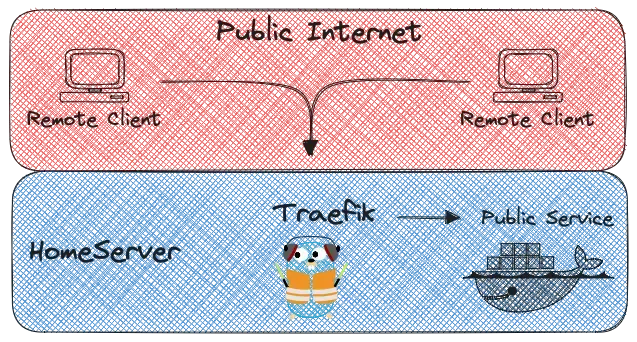
Now copy this code snippet into the docker-compose.yaml file:
# https://github.com/Bruceforce/vaultwarden-backup
---
services:
  vaultwarden:
    container_name: vaultwarden
    hostname: vaultwarden
    image: vaultwarden/server:latest-alpine
    dns:
      - 1.1.1.1
    environment:
      - LOG_FILE=/data/logs/access.log
      - WEBSOCKET_ENABLED=true
      - SIGNUPS_ALLOWED=true
      - ADMIN_TOKEN=#sPqDJ!WxJAkA
      - I_REALLY_WANT_VOLATILE_STORAGE=true
      - ROCKET_ENV=prod
      - ROCKET_WORKERS=10
      - TZ=America/Chicago
      - LOG_LEVEL=error
      - EXTENDED_LOGGING=true
    ports:
      - 4044:80
    labels:
      - "traefik.enable=true"
      - "traefik.docker.network=traefik"
      - "traefik.http.routers.vaultwarden-http.entrypoints=http"
      - "traefik.http.routers.vaultwarden-http.middlewares=redir-https"
      - "traefik.http.routers.vaultwarden-http.rule=Host(`vaultwarden.linuxpad.blog`)"
      - "traefik.http.routers.vaultwarden-http.service=noop@internal"
      - "traefik.http.routers.vaultwarden-https.entrypoints=https"
      - "traefik.http.routers.vaultwarden-https.tls=true"
      - "traefik.http.routers.vaultwarden-https.middlewares=gzip"
      - "traefik.http.routers.vaultwarden-https.rule=Host(`vaultwarden.linuxpad.blog`)"
      - "traefik.http.services.vaultwarden-backend.loadbalancer.server.scheme=http"
      - "traefik.http.services.vaultwarden-backend.loadbalancer.server.port=4044"
      - "traefik.http.routers.vaultwarden-https.middlewares=authelia@docker"

    volumes:
      - /opt/vaultwarden/data:/data
      - /opt/vaultwarden/logs:/data/logs
    restart: unless-stopped

  vaultwarden-backup:
    container_name: vaultwarden-backup
    hostname: vaultwarden-backup
    image: bruceforce/vaultwarden-backup:latest
    init: true

    volumes:
      - /opt/vaultwarden/data:/data/
      - /opt/vaultwarden/backup:/vaultwarden-backup
      - /etc/localtime:/etc/localtime:ro
      - /etc/timezone:/etc/timezone:ro
    environment:
      - TIMESTAMP=true
      - DELETE_AFTER=30
      - UID=0
      - GID=0
      - TZ=America/Chicago
      - BACKUP_DIR=/vaultwarden-backup
      - CRON_TIME=50 3 * * *
    restart: unless-stopped
    depends_on:
      - vaultwarden

networks:
    traefik:
        external: true
Finally, start the service with docker compose up -d. Congrats!
We have successfully installed Vaultwarden from source and configured it to run behind traefik as a reverse proxy.